Rocky Linux / Memo
SSH 접속 포트 변경 방법
예를 들어 SSH 접속 포트를 22에서 50022로 변경하고 싶다면, /etc/ssh/sshd_config에서 다음을
#Port 22
다음처럼 변경하고
Port 50022
서비스를 다시 시작합니다.
# systemctl restart sshd
SELINUX가 활성화되어 있다면 다음과 같이 명령하여 50022 포트를 사용할 수 있게 만듭니다.
# semanage port -a -t ssh_port_t -p tcp 50022
방화벽을 사용하고 있다면 50022 포트를 열어줍니다.
# firewall-cmd --permanent --zone=public --add-port=50022/tcp
# firewall-cmd --reload
Wi-Fi를 사용하고 싶다면
와이파이를 사용하고 싶다면 NetworkManager-wifi 패키지를 설치합니다.
# dnf install NetworkManager-wifi
비밀번호 복잡도 설정하는 방법
다음 파일 을 수정합니다.
/etc/security/pwquality.conf
파일 내용은 다음과 같습니다.
# The check is disabled if the value is 0.
# maxclassrepeat = 0
#
# Whether to check for the words from the passwd entry GECOS string of the user.
# The check is enabled if the value is not 0.
# gecoscheck = 0
#
# Whether to check for the words from the cracklib dictionary.
# The check is enabled if the value is not 0.
# dictcheck = 1
#
# Whether to check if it contains the user name in some form.
# The check is enabled if the value is not 0.
# usercheck = 1
#
# Length of substrings from the username to check for in the password
# The check is enabled if the value is greater than 0 and usercheck is enabled.
# usersubstr = 0
#
# Whether the check is enforced by the PAM module and possibly other
# applications.
# The new password is rejected if it fails the check and the value is not 0.
# enforcing = 1
#
# Path to the cracklib dictionaries. Default is to use the cracklib default.
# dictpath =
#
# Prompt user at most N times before returning with error. The default is 1.
# retry = 3
#
# Enforces pwquality checks on the root user password.
# Enabled if the option is present.
# enforce_for_root
#
# Skip testing the password quality for users that are not present in the
# /etc/passwd file.
# Enabled if the option is present.
# local_users_only
텍스트 모드로 설치하는 방법
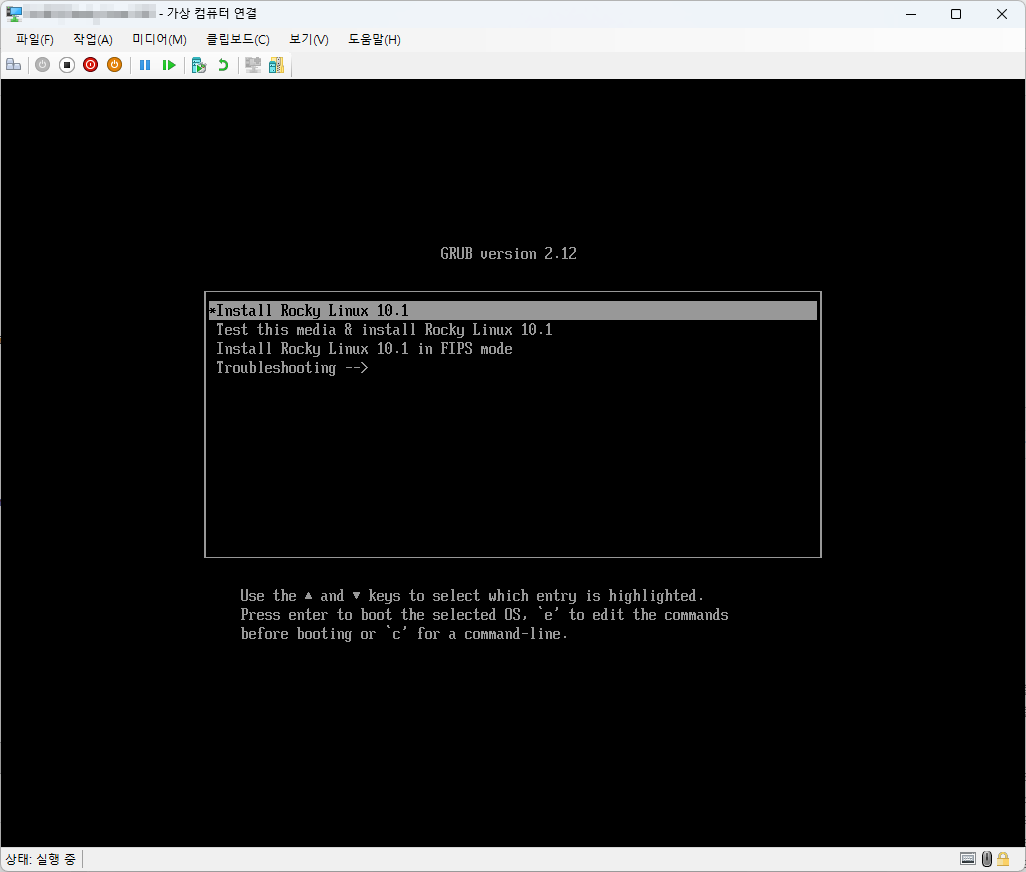
- 다음과 같은 화면이 나왔을 때 e를 입력합니다.
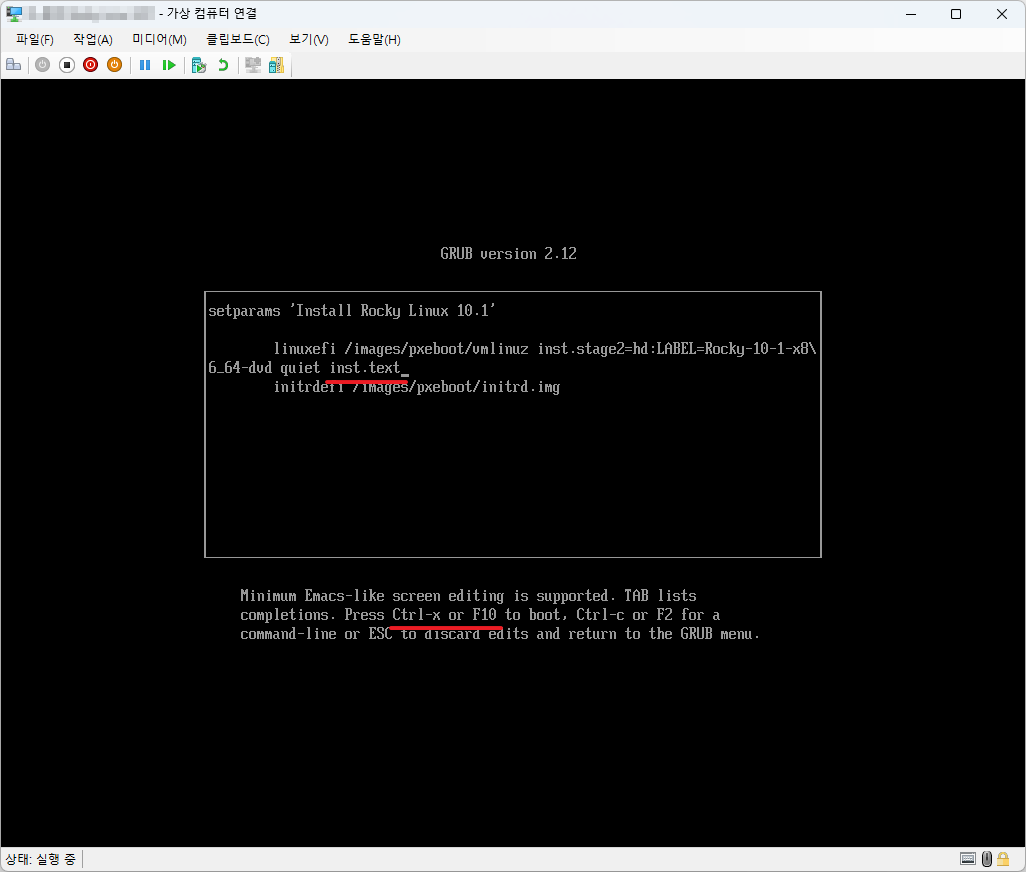
- inst.text를 추가합니다.
- Ctrl + X 또는 F10을 입력합니다.
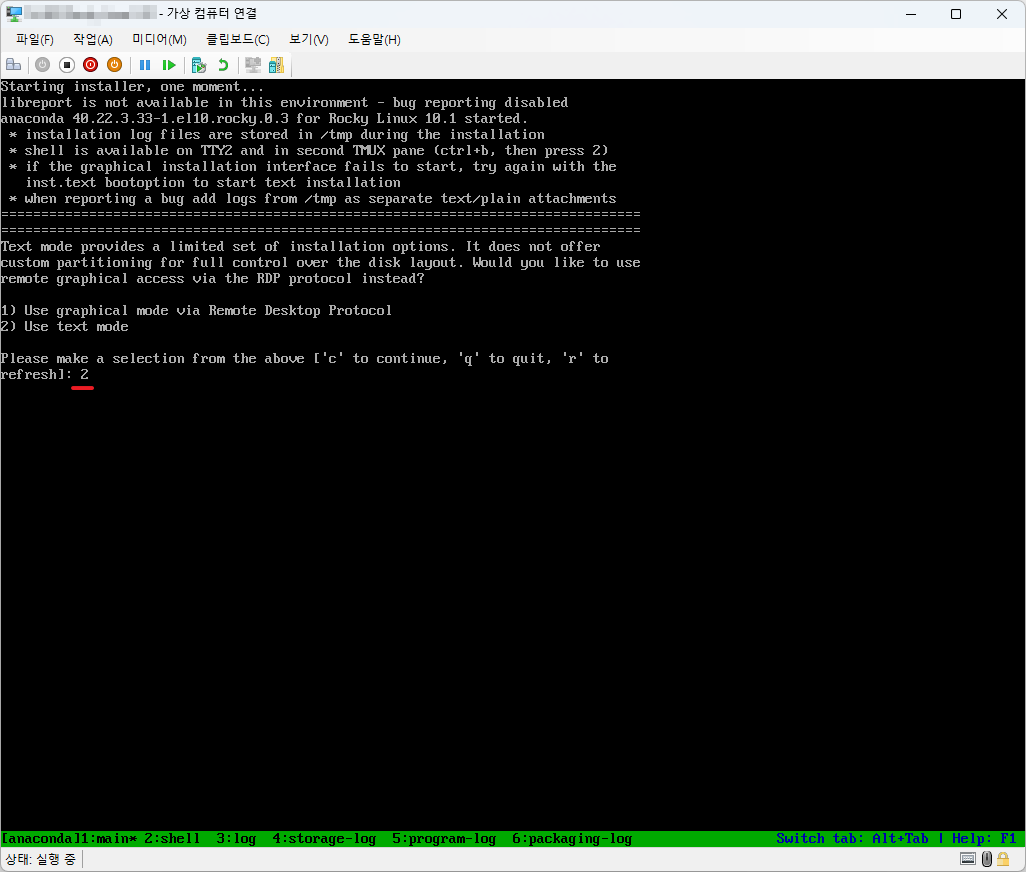
- 2를 입력합니다.
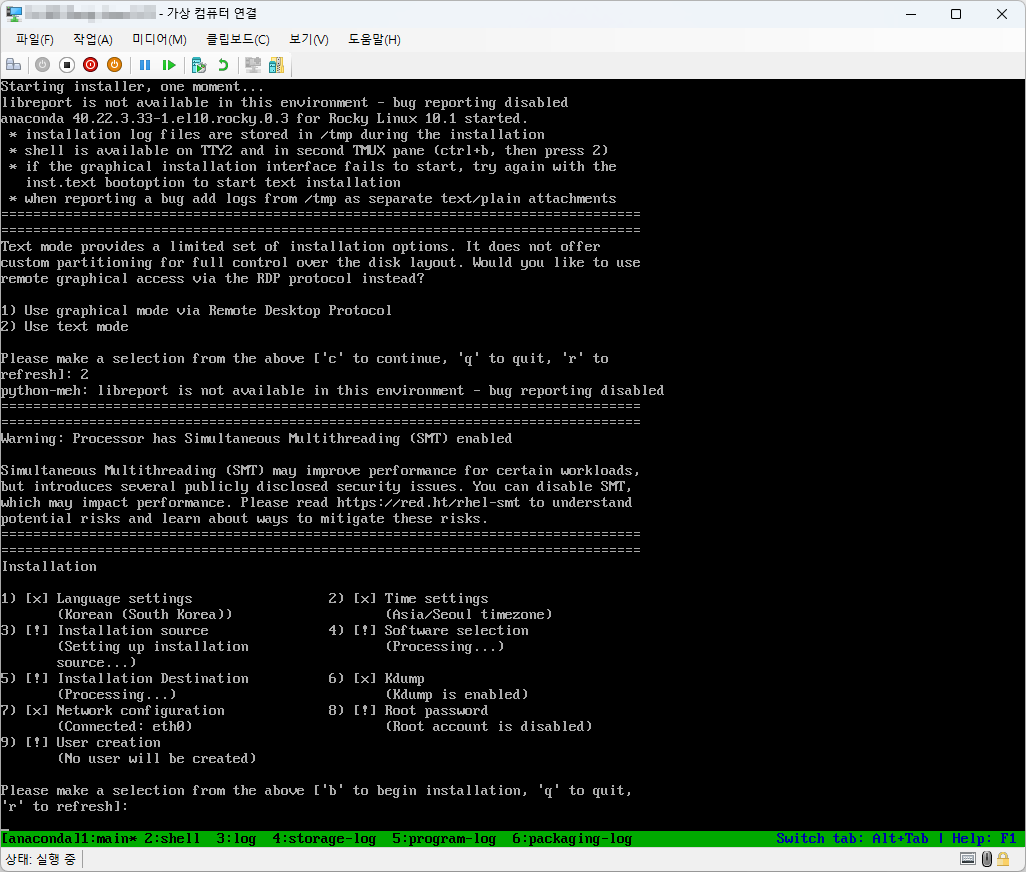
- 텍스트 모드에서 설치를 진행합니다.

Rocky Linux에서 hostnamectl로 호스트네임을 변경하고 결과를 확인하는 방법을 설명합니다. 이름 해석과 서비스 재시작이 필요한 경우도 함께 살펴봅니다.

Rocky Linux에 GNOME GUI를 설치하고 그래픽 부팅을 설정하는 방법을 설명합니다. Rocky Linux 8·9의 XRDP와 Rocky Linux 10의 GNOME 원격 데스크톱 차이도 정리합니다.

Rocky Linux에 MariaDB를 설치하고 초기 보안을 설정하는 방법을 설명합니다. 최소 권한 계정, 원격 수신 주소, 방화벽 원본 제한과 TLS 점검 사항도 정리합니다.

Rocky Linux에서 nmcli로 고정 IP와 DHCP, DNS, IPv6 연결 프로필을 설정하는 방법을 설명합니다. 원격 변경 전 주의점과 확인 명령도 함께 정리합니다.

Rocky Linux / PostgreSQL 설치하는 방법
Rocky Linux에 PostgreSQL을 설치하고 초기화·서비스 활성화·역할 생성·원격 접속을 구성하는 방법을 설명합니다. pg_hba.conf, SCRAM, 방화벽과 TLS 주의점도 정리합니다.

Rocky Linux와 관련된 잡다한 정보를 정리합니다.

Rocky Linux firewalld에서 영역, 서비스와 포트를 확인·관리하는 방법을 설명합니다. 런타임 시험 후 영구 저장하고 원본 주소를 제한하는 안전한 절차를 정리합니다.

Rocky Linux에서 설치된 패키지를 DNF와 RPM으로 확인하는 방법을 설명합니다. 전체 목록, 특정 파일의 소유 패키지, 설치 시각과 변경 검증 방법도 정리합니다.

Rocky Linux의 SELinux 상태와 모드를 확인하고 차단 원인을 해결하는 방법을 설명합니다. Permissive 전환, 정책 조정과 완전 비활성화 시 주의점도 정리합니다.

Rocky Linux에서 localectl과 언어 팩으로 시스템 로케일을 확인·변경하는 방법을 설명합니다. 세션별 변경, LANG·LC_* 우선순위와 한글 깨짐 점검도 정리합니다.